Share a file: Specify a period
Preconditions: Roles and permissions
Roles
| Area | Function | Admin | Designer | User | Guest |
|---|---|---|---|---|---|
| Projects | |||||
| Download, save, open a project | x | x | |||
| Upload a project | x | x | |||
| Delete project | x | x | |||
| Move a project | x | x | |||
| Publish a project in eView | x | x | |||
| Open a project in eView | x | x | x | x | |
| Generate a project for an older platform version | x | x | |||
| Share a project with an internal user | x | x | |||
| Share a project with an external user | x | x | |||
| Share a project with a team | x | x | |||
| Share a project; specify a period | x | x | |||
| View all projects within the organization | x | ||||
| View project details | x | x | x | x | |
| View project detail "Shared with" | x | x | x | ||
| Download project document | x | x | |||
| Download project image | x | x | |||
| View project document | x | x | x | ||
| View project image | x | x | x | ||
| Folders | |||||
| Create folder | x | x | |||
| Delete folder | x | x | |||
| Move folder (view folder structure) | x | x | |||
| Update folder | x | x | |||
| View folder details | x | x | x | x | |
| View folder name in which the project is located | x | x | x | ||
| Master Data | |||||
| Upload master data | x | x | |||
| Download master data | x | x | |||
| Share master data with an internal user | x | x | |||
| Share master data with a team | x | x | |||
| Share master data; specify a period | x | x | |||
| Delete master data | x | x | |||
| View master data details | x | x | x | x | |
| View "Shared with" master data detail | x | x | x | ||
| Files | |||||
| Upload file | x | x | |||
| Download file | x | x | |||
| Share a file with an internal user | x | x | |||
| Share a file with an external user | x | x | |||
| Share a file with a team | x | x | |||
| Share file; set time period | x | x | |||
| Delete file | x | x | |||
| View file | x | x | x | ||
| View file details | x | x | x | x | |
| View "Shared with" file detail | x | x | x |
Permissions
| Area | Function | Edit | Limited (Edit) | View |
|---|---|---|---|---|
| Projects | ||||
| Download, save, open a project | x | |||
| Upload a project | x | |||
| Delete project | x | |||
| Move a project | x | |||
| Publish a project in eView | x | |||
| Open a project in eView | x | |||
| Generate a project for an older platform version | x | |||
| Share a project with an internal user | x | |||
| Share a project with an external user | x | |||
| Share a project with a team | x | |||
| Share a project; specify a period | x | |||
| View all projects within the organization | ||||
| View project details | x | x | x | |
| View project detail "Shared with" | x | x | ||
| Download project document | x | |||
| Download project image | x | |||
| View project document | x | x | ||
| View project image | x | x | ||
| Folders | ||||
| Create folder | x | |||
| Delete folder | x | |||
| Move folder (change folder structure) | x | |||
| Update folder | x | |||
| View folder details | x | x | x | |
| View folder name in which the project is located | x | x | ||
| Master Data | ||||
| Upload master data | x | |||
| Download master data | x | |||
| Share master data with an internal user | x | |||
| Share master data with a team | x | |||
| Share master data; specify a period | x | |||
| Delete master data | x | |||
| View master data details | x | x | x | |
| View "Shared with" master data detail | x | x | ||
| Files | ||||
| Upload file | x | |||
| Download file | x | |||
| Share a file with an internal user | x | |||
| Share a file with an external user | x | |||
| Share a file with a team | x | |||
| Share a file; specify a period | x | |||
| Delete file | x | |||
| View file | x | x | ||
| View file details | x | x | x | |
| View "Shared with" file detail | x | x |
You have the possibility to specify the period of use for the user or the team.
Projects, master data or files shared with you can also be shared with another user if you have the permission "Edit". If your period of use for projects or master data is limited, the user you invite can also access projects or master data only during this period. You can also specify the period for the invited user. However, it has to lie within your period of use.
Share a file internally: Specify a period
You share your project, master data or files with a user in your company organization or organization.
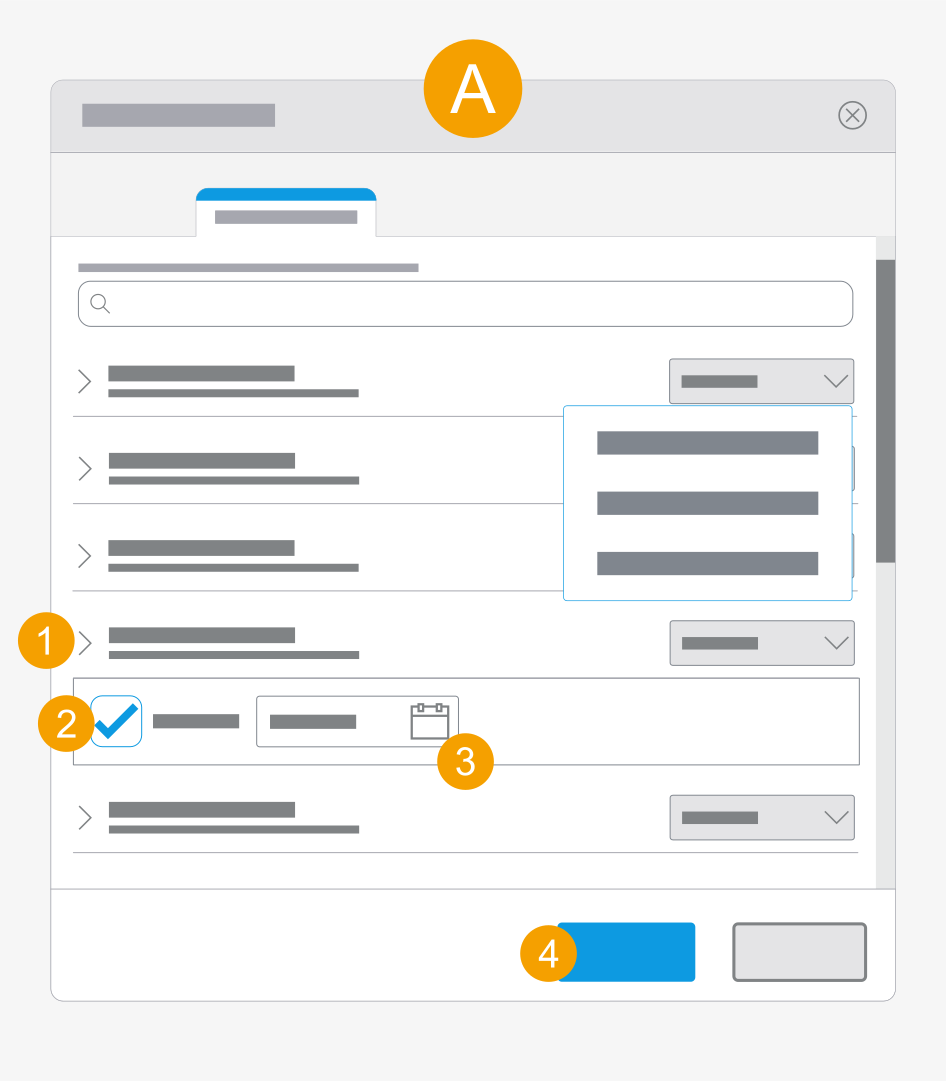
The Share file dialog is opened, the user has the Designer role and a permission.
- Click the drop-down list at the desired user.
- Confirm Share until:.
- Click the date field and select a date.
- Click Apply.
- The period for which the user has access to the file is limited.
Share a file externally: Specify a period
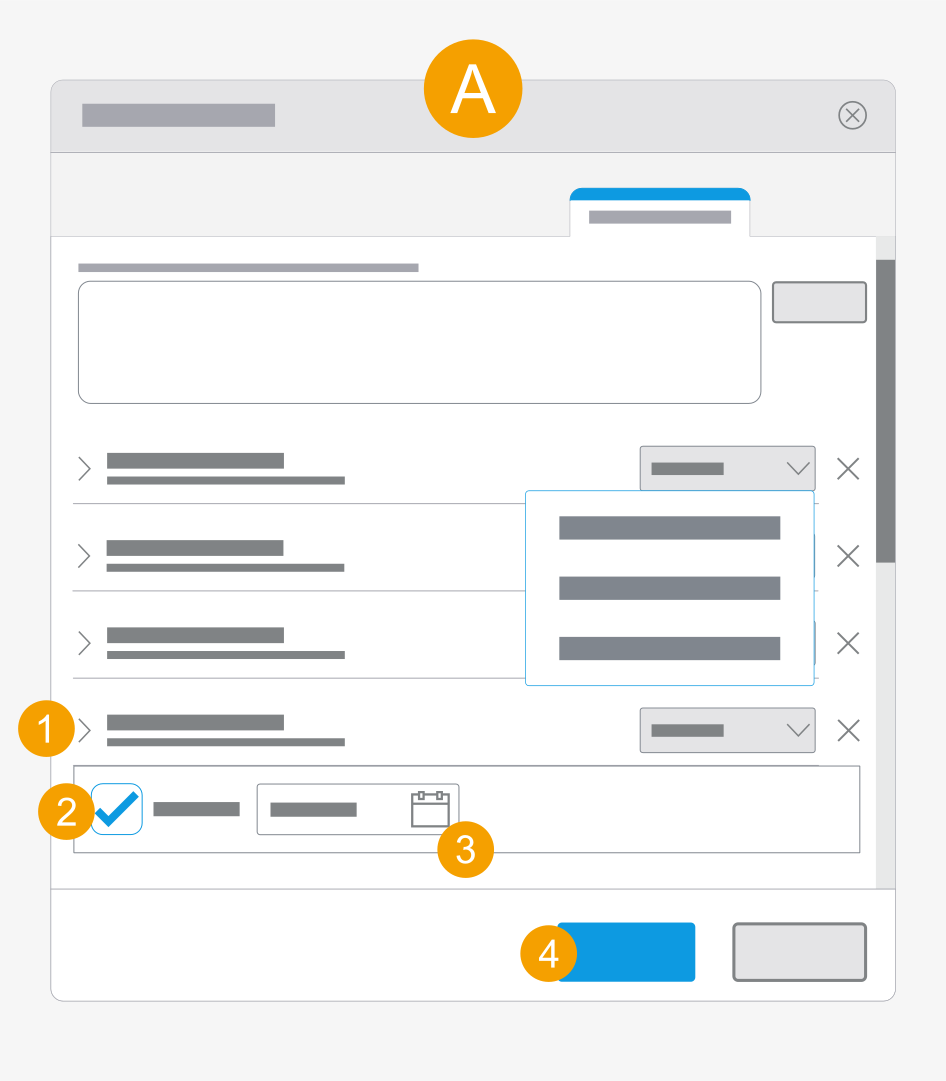
The Share file dialog is opened, the user has the Designer role and a permission.
- Click the drop-down list at the desired user.
- Confirm Share until:.
- Click the date field and select a date.
- Click Apply.
- The period for which the user has access to the file is limited.
Share a file with a team: Specify a period
You share your project or files with a team in your company organization or organization.
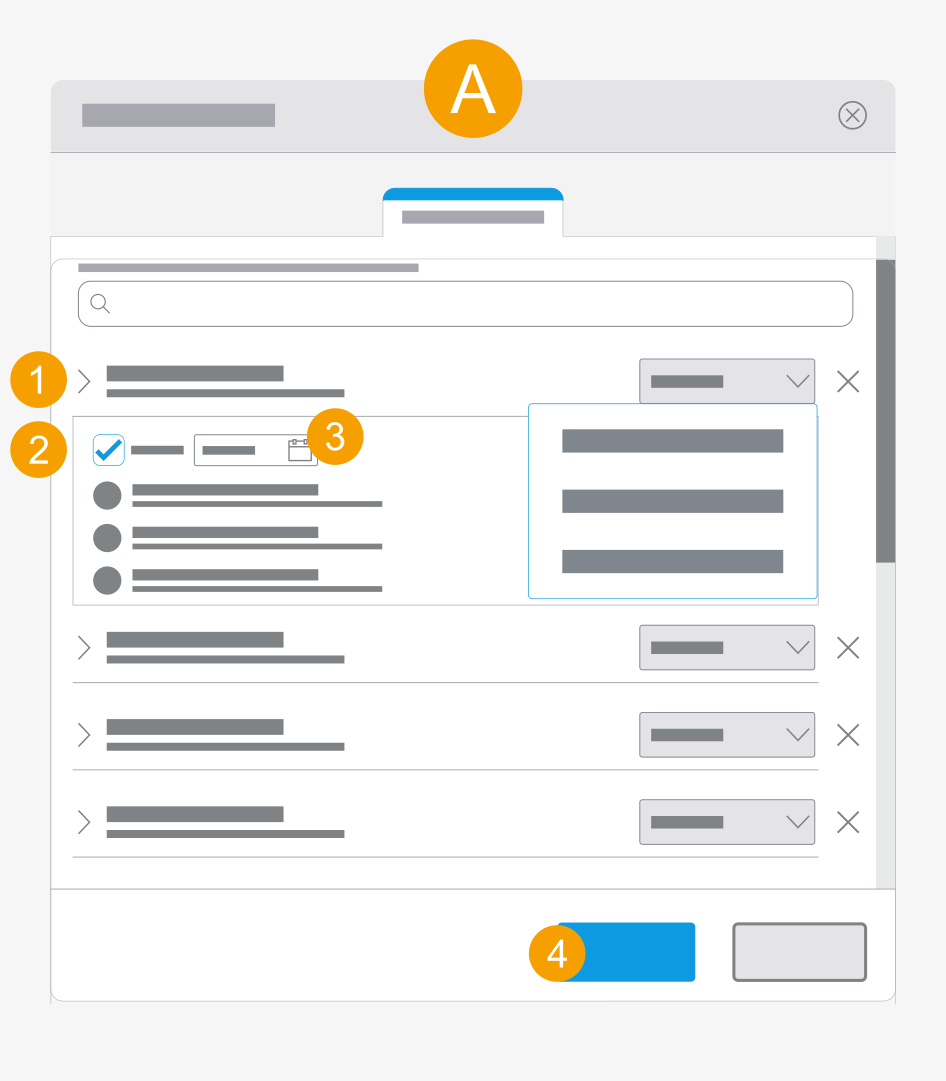
The Share file dialog is opened, the user has the Designer role and a permission.
- Click the drop-down list at the desired user.
- Confirm Share until:.
- Click the date field and select a date.
- Click Apply.
- The period for which the user has access to the file is limited.