Leave, delete, restore company organization
Prerequisite: Open My settings.
This functionality is only available to you in the browser.
 Leave company organization
You can only leave the company organization if you are a user of the company organization. The main administrator cannot leave their own company organization.
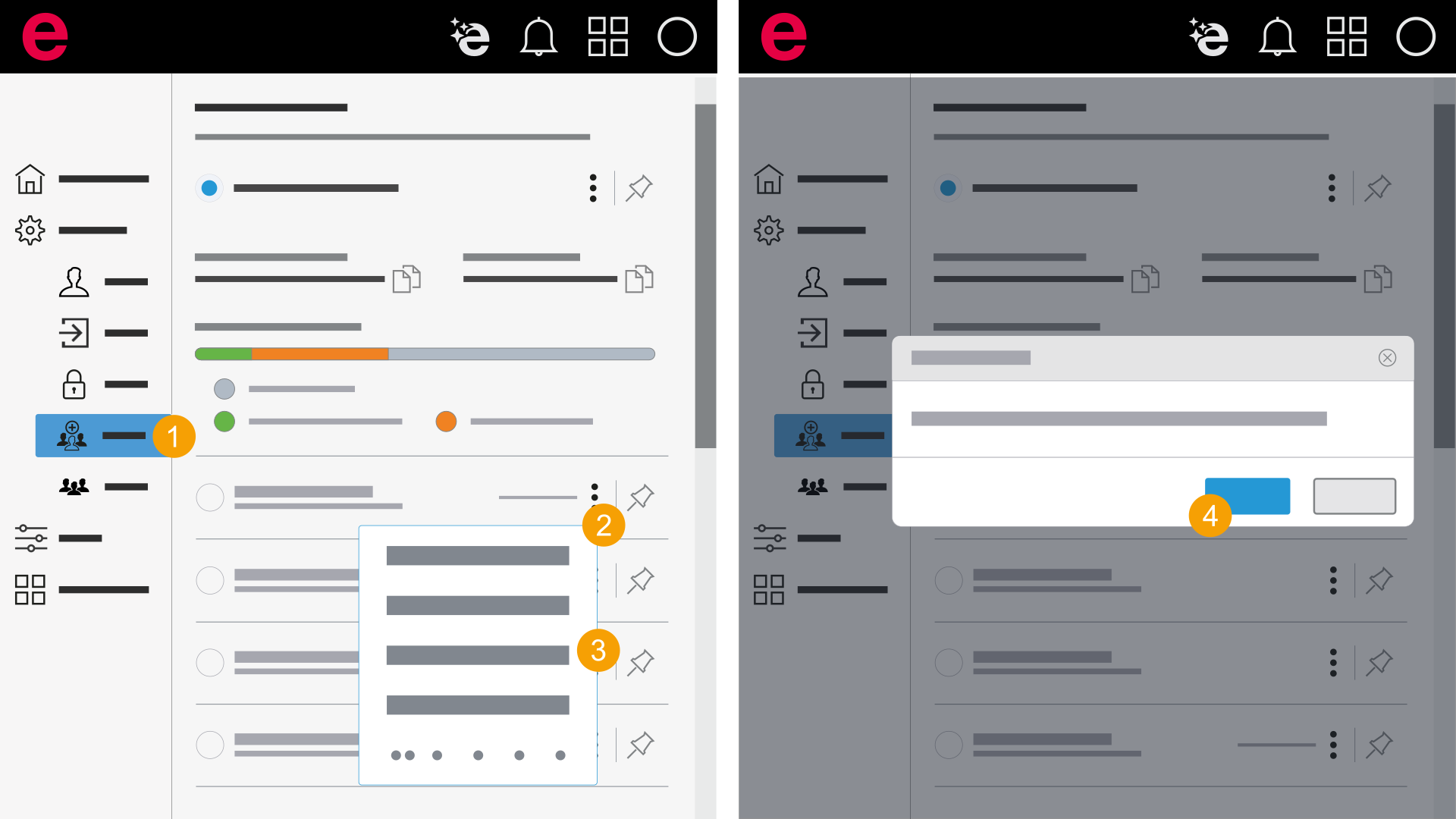
- My settings > General > Organizations
- In the navigation bar, click General > Organizations.
- Click the
 icon next to the company organization.
 - Click Leave.
- Click Leave.
- You have successfully left the company organization.
A dialog opens which informs you about which organization you are leaving.
If you are part of the company organization you are signed off.
If you now sign in again the organization is not available for selection anymore.
Delete company organization
A company organization can only be deleted by Eplan.
If you want to delete your company organization, use the Contact functionality in the Cloud menu to contact Eplan.
When this happens, the customer number is separated from the company organization. This turns the company organization into a normal organization. You can then delete this organization as described above.
Restore company organization
A company organization can only be restored by Eplan.
Since a company organization becomes an organization when it is deleted, you can restore the organization, but not as a company organization.
If you want to restore your company organization, use the Contact functionality in the Cloud menu to contact Eplan.