Projekt herunterladen, speichern und öffnen
Projects which you open from eManage in the platform are downloaded and saved locally on your computer beforehand and are only then opened in the platform. This means each modification you perform on the project is local and can therefore be performed offline.
You can also download projects in the browser and open them at a later point in the platform with and without Internet connection. As soon as you have finished your modifications, you can just upload the project again and the updated project is available again for those users with whom you have shared the project.
 Voraussetzungen: Rollen und Berechtigungen
Rollen
| Area | Function | Admin | Designer | User | Guest |
|---|---|---|---|---|---|
| Projects | |||||
| Download, save, open a project | x | x |
Berechtigungen
| Area | Function | Edit | Limited (Edit) | View |
|---|---|---|---|---|
| Projects | ||||
| Download, save, open a project | x |
Projekt in der Plattform herunterladen und öffnen
In eManage hochgeladene Projekte aus älteren Electric P8-Versionen, können direkt in einer neueren Electric P8-Version geöffnet werden.
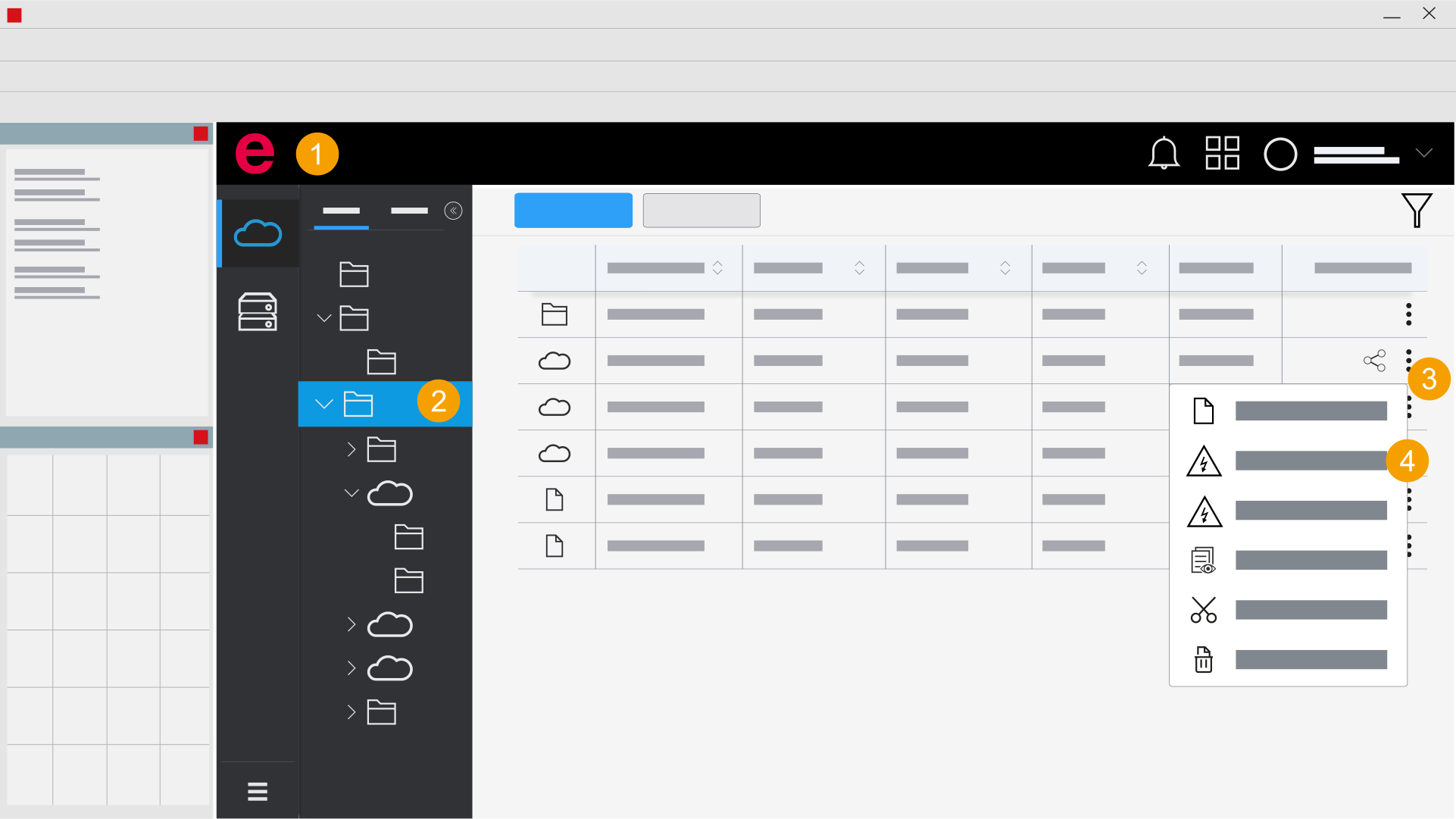
- Eplan Cloud > eManage (Datenverwaltung) > Projekte
- Öffnen Sie den Ordner mit dem gewünschten Projekt.
- Klicken Sie auf das Icon
 .
. - Abhängig von der Plattform-Version, klicken Sie
 "XY-Projekt öffnen".
 - Klicken Sie auf OK.
- Klicken Sie auf Ja.
- Wählen Sie aus, ob Sie die Stammdaten aktualisieren wollen.
- Klicken Sie auf OK.
- Das Projekt wurde geöffnet.
Der Dialog Projekt wiederherstellen wird geöffnet.
Sie können ein Zielverzeichnis auswählen, in dem die Plattform-Version lokal gespeichert werden soll.
Der Dialog Wiederherstellen wird geöffnet.
Der Dialog Projektstammdaten wird geöffnet.
Der Dialog Wiederherstellen wird geöffnet.
Die Plattform-Version wurde lokal im Zielverzeichnis gespeichert.
Um die Version zu Teilen, laden Sie die Plattform-Version auf eManage hoch.
If you have finished editing a project and want to make the changed project available in eManage, you must upload it again. For more information, see Upload a project.
Projekt im Browser herunterladen, speichern und in der Plattform öffnen
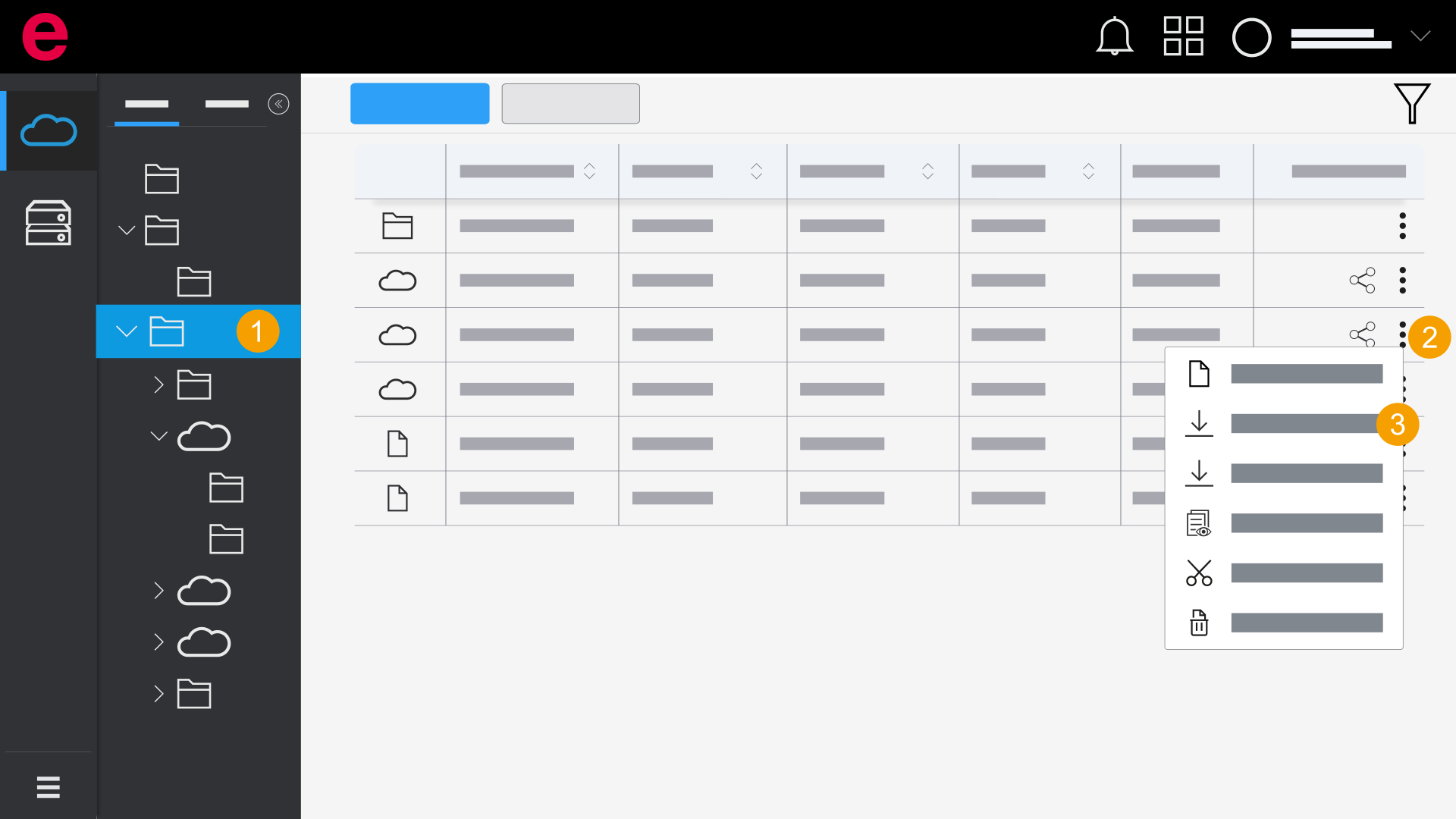
- eManage > Projekte
- Öffnen Sie den Ordner mit dem gewünschten Projekt.
- Klicken Sie auf das Icon .
- Abhängig von der Plattform-Version, klicken Sie
 "XY-Projekt herunterladen".
Das Projekt wird heruntergeladen.
Die weiteren Schritte zum Herunterladen, Speichern und Öffnen sind abhängig von Ihrem Browser und dessen Einstellungen.
If you have finished editing a project and want to make the changed project available in eManage, you must upload it again. For more information, see Upload a project.